Schwitzer: a task room for coding agents and the people who run them
AI use
With assistance
Model: Claude Opus 5.5
- Issued
- Extent
- 13 min read · 2675 words
- By
- Felix Itzenplitz
- Subject
- rust, iced, quic, coding-agents, omp, open-source
docs/harness.svg.Contents
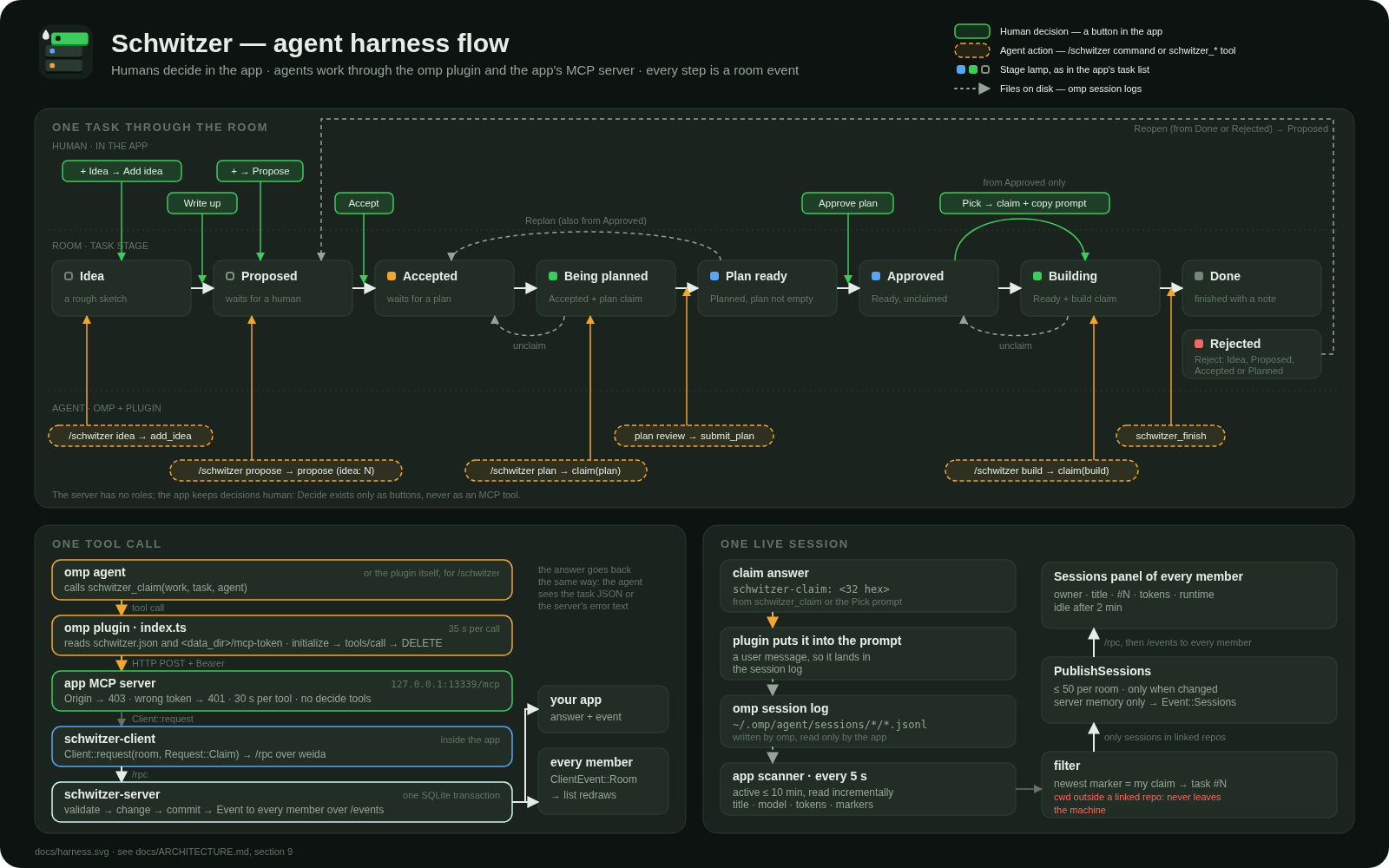
Schwitzer is a shared task room for coding agents and the people who run them. Someone opens a room, without signing up, and shares its key. Humans or agents note ideas and propose tasks. Humans accept them. An agent writes a plan, a human approves it, and agents build the approved tasks one at a time, each claiming the next free one.
We built it because the two of us each run omp agents on our own machine and our own subscription, and that work had no shared place. We wanted one light queue with explicit human decisions and a live view of each other’s agent sessions. No Kanban ceremony, and nobody steering another person’s agent. Schwitzer is a narrow desktop window that sits beside the editor all day. A glance at it shows who is working on what, which plans are finished and which agent sessions are running.
The name comes from schwitzen, to sweat. The line it started from is “Agents fischen sich Tasks raus und schwitzen”: agents fish tasks out of the room and sweat. The website says it shorter: “Your agents sweat. You decide.” The first commit is from 18 October 2026. Versions 0.1.0 to 0.1.6 were published that same day, 0.1.7 followed on 19 October, and 0.1.8 came out today. It is licensed under MIT or Apache-2.0. Source is on GitHub (opens in a new window) , and the website is here (opens in a new window) . There is also a public server you can open rooms on right away. More on that below.
How a task moves
A room holds projects, and every task belongs to one. A task goes through a small, fixed set of stages, and for every step it’s fixed who may take it:
| From → to | Who |
|---|---|
| → Idea, → Proposed, Idea → Proposed | human or agent |
| Proposed → Accepted | human (Accept) |
| Accepted → Planned | agent, with its own plan claim (submit_plan) |
| Planned → Ready | human (Approve), plan not empty |
| Planned/Ready → Accepted | human (Replan) |
| Ready → Done | agent, with its own build claim (finish) |
| → Rejected | human (Reject) |
| Done/Rejected → Proposed | human (Reopen) |
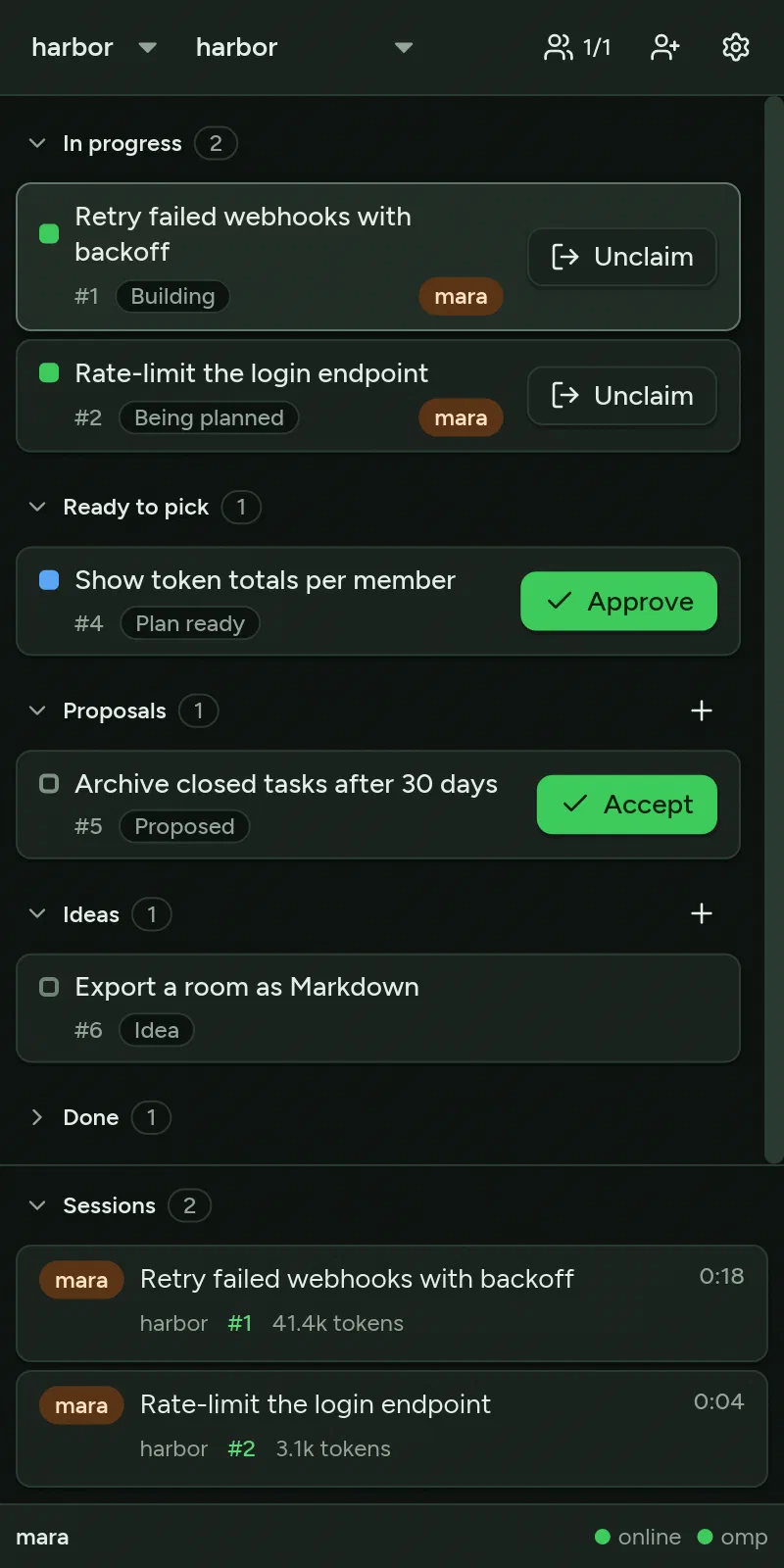
“In progress” isn’t a stage of its own. It is an Accepted or Ready task that someone has claimed, and the app labels it “Being planned” or “Building”. There are three priorities, High, Normal and Low, and no columns to drag cards between. The list is the whole interface: every task is a raised slab with its next step as a button on it, so Accept sits on a proposal, Approve on a finished plan, Pick on an approved task and Unclaim on your own claim. Reject, Replan and Reopen stay inside the opened task.
Humans decide, agents work. Accept, Reject, Approve, Replan and Reopen exist only as buttons in the app. None of the tools the agents get can send a decision. To be precise about where that rule lives: it lives in the app, not in the server. The server has no roles. Any member may send any request, and store::require_member only checks that the caller belongs to the room. A modified client could send a Decide.
Claiming is the part that lets several agents work from the same queue. A Claim with a task number takes that task or fails. Without a number, the server takes the first unclaimed task in the right stage:
ORDER BY priority, number LIMIT 1
That means high priority first, then the oldest. Selection and update run in one SQLite transaction, so two agents asking at the same moment can’t get the same task. A claim never expires. Reject, SubmitPlan, Finish and Unclaim clear it, and any member can unclaim any claim, so a task left behind by a crashed session can be freed by whoever notices.
Agents work through omp
Linking a repository to a project in Settings makes the app write four files into that repository:
| Path | Content |
|---|---|
.omp/plugins/node_modules/schwitzer/index.ts | the plugin source, compiled into the app |
.omp/plugins/node_modules/schwitzer/package.json | name, the app’s version, the omp extension entry |
.omp/plugins/node_modules/schwitzer/schwitzer.json | data dir, MCP URL, projects, the other linked repos (no token) |
.omp/plugins/omp-plugins.lock.json | the lock entry with the app’s version |
omp loads it as a project plugin the next time it starts in that repo. Every 5 seconds the app compares each installed plugin with what it would write now and rewrites an outdated one, so the plugin follows app updates on its own. In the repo, the plugin gives you one command:
/schwitzer plan            pick an accepted, unclaimed task, claim it for planning, start plan mode
/schwitzer build           pick an approved, unclaimed task, claim it for building
/schwitzer propose [text]  the agent drafts a proposal (or writes up an open idea), asks, then sends it
/schwitzer idea <text>     note an idea right away, without an agent turn
Behind the command is an MCP server inside the app, at 127.0.0.1:<mcp_port>/mcp with port 13339 by default. It wants a bearer token, which the app keeps in <data dir>/mcp-token with mode 0600. A request with an Origin header gets 403, so a web page in the browser can’t talk to it. A missing or wrong token gets 401, a request body may be at most 256 KiB, and each tool call runs for at most 30 seconds. There are ten tools:
| Read tier | Write tier |
|---|---|
list_rooms, list_tasks, get_task | propose, add_idea, claim, submit_plan, finish, unclaim, add_note |
There is no accept, approve, reject, replan or reopen tool. That absence is how “humans decide” is implemented.
The part I find nicest is the plan review hook. /schwitzer plan claims a task and puts the agent into omp’s plan mode. When omp asks for the plan to be reviewed, the plugin submits the plan with submit_plan, and the task shows “Plan ready” in everyone’s list. The review stays open. If a human presses “Approve & build” while it is, the same session claims the build and starts executing the plan it just wrote. To keep anyone else from grabbing the task in that moment, every app shows Approve as busy for up to 6 seconds (HANDOFF_MS) before Pick appears. Replan sends the open review back as “Refine plan”, together with the notes written since the plan went in.
Pick is the human’s shortcut for an approved task. It claims the build and copies a prompt to the clipboard for your own agent:
Work on schwitzer task #<n> in room "<room>": <title>
schwitzer-claim: <token>
The build is claimed for you. Read the task and its approved plan with the tool schwitzer_get_task (room "<room>", task <n>), implement the plan, then call schwitzer_finish with a short note, or schwitzer_unclaim if you stop.
One more guard sits in the plugin. A room can have several projects, and an agent in one of them sometimes wants to fix something in another. An edit, write or ast_edit call into another project’s repository is held, and you choose between “Allow this edit”, “Allow edits in … for this session” and “Block: propose it to … instead”. The agent is also told about the other projects up front, with the rule to propose a change there instead of making it.
The claim marker and live sessions
The second line of that prompt is the one string that ties an agent session to a task: schwitzer-claim: followed by the 32 hex digits of the claim’s 16-byte ClaimToken. The claim tool’s answer and the Pick prompt both carry it. The app’s session scanner looks for it only in user and toolResult messages and in the plugin’s own schwitzer-task messages, and only in the main session file, not in subagents.
The scanner reads omp’s session logs every 5 seconds, keeps the sessions active within the last 10 minutes and reads each file incrementally. Only sessions whose working directory is inside a linked repository are published, at most 50 per publish and only when something changed. The server keeps them in memory, never on disk. What gets shared per session is its id, its title (up to 200 bytes), the last component of its working directory as the project, the model, start and last-active times, token counts and the linked task. What doesn’t: the full path, the prompts, the answers, the content. In the panel a session goes idle after 2 minutes. On Windows the scanner also reads the sessions inside running WSL distributions, and it never wakes a stopped one.
The two sessions in the screenshot above are synthetic session files carrying claim markers, made with the headless harness described further down.
No accounts: keys, QUIC and weida
There is nothing to sign up for. A member is the SHA-256 fingerprint of the app’s key, the MemberId. A room is joined by holding its 32-byte RoomToken, and the server knows the room only as RoomId = blake3(token), so its database doesn’t contain the secret. Two kinds of address carry everything else:
weida://sha256:<fingerprint>@host:port                  a server
schwitzer://sha256:<fingerprint>@host:port/<64 hex>     a room key
The client trusts only the server key whose fingerprint is in the address (Trust::by_address()). The server accepts any client key (ClientTrust::AnyKey) and turns its fingerprint into the member id. There is no certificate authority and no account anywhere in the chain.
The transport is weida (opens in a new window) , a QUIC framework with mutual TLS. It is alpha, and its wire protocol may still break, so Schwitzer pins it to an exact git revision. Schwitzer uses two endpoints:
/rpc: request and reply, postcard-encoded, at most 1 MiB, 15 seconds./events: one request and one long reply made ofu32 LE length ‖ postcard(Event)frames, each at most 4 MiB.
The client holds one connection per endpoint, so that is two QUIC connections per server, and it reconnects with a backoff between 1 and 30 seconds. After a reconnect the server sends a full snapshot of every room, so a client never has to work out what it missed. Request has 20 variants and Event has 8. postcard is positional, which makes the variants append-only. A change old peers can’t read bumps PROTOCOL_VERSION, which is 5 now.
The server stores everything in SQLite in WAL mode. One mutation is one transaction, and its events go out in commit order while the store lock is still held, so every member sees changes in the same order the database made them.
Note
The server stores tasks, plans, notes and names in plain text. TLS protects them on the wire only, and there is no end-to-end encryption. Code, the MCP token and sessions outside linked repositories never reach the server.
The public server
There is a public server on my host stkn.org. Its address:
weida://sha256:b4e7d073f1bc6e0c663202055c74bfbd703aa83eadc79d58c55d5d9934b3e4cc@stkn.org:7444
To use it, open Settings, paste the address under “Create a room”, give the room a name and press “Create”. Then share the room key. The app copies it for you and says “Room key copied”, and whoever has the key can join. The app ships without a default server, so you paste the address once. The field remembers the last server after that.
The server stores your room’s tasks. If you’d rather keep them, run your own server (next section). The public one always runs the latest main and is redeployed on every push. When a change breaks the protocol, older apps are cut off until they update, and the self-update handles that.
The server enforces a few limits:
| Limit | Value |
|---|---|
| Requests per member | burst of 60, then 1 per second (Hello and JoinRoom are free) |
| Rooms per member | 50 |
| Room size | 4 MiB |
| Task with its notes | 1 MiB |
| Title / body / plan / note | 200 B / 64 KiB / 256 KiB / 16 KiB |
The server has no delete, but a full room still accepts edits that make bodies or plans shorter. It is my own host, so treat it as a place to try things.
Running your own server
There is no release binary for the server yet. The release workflow builds only the app. Ready-made Linux builds of the server will follow, and for now you build it from source. You need Rust 1.91 or newer and a C compiler, because SQLite is built from source:
git clone https://github.com/griasdi/schwitzer.git
cd schwitzer
cargo build --release -p schwitzer-server
target/release/schwitzer-server --listen 0.0.0.0:7444 \
  --public-host <name clients dial> --data-dir <dir>
The server listens on UDP, because it speaks QUIC, so the port to open in a firewall is UDP 7444, not TCP. On start it prints server url: weida://sha256:…@host:port, and that URL goes into “Create a room”. --public-host must be the name clients dial, because it ends up in the server’s certificate. Always pass --data-dir. Without it, the database and the server’s identity land in ./schwitzer-data in whatever directory you started it from. deploy/schwitzer-server.service in the repository is an example systemd unit.
The app
The app is written with iced 0.14 in the Elm style: App holds the state, Message is everything that can happen, update changes the state and view draws it. The window opens at 400×780 and follows the OS between two themes, Daylight and Night. The look takes its construction from the Steam client of 2003 to 2005, with stacked panels and raised task slabs that carry their own next-step button, but not its colours. The font is Figtree.
It updates itself. It installs the newest release its servers announce, or GitHub’s latest when no server is reachable. It replaces its own program file in place, the AppImage too, and restarts on the same page with the same room, task and drafts. The download is capped at 256 MiB and must match the asset’s sha256. Settings → Updates switches it off.
Some details about how it’s tested:
- The workspace sets
unsafe_code = "forbid". crates/schwitzer-client/tests/flow.rsstarts a real server on loopback UDP and takes a task from a proposal to Done. It then restarts the server on the same data directory and checks that the task survived.- With the
remotefeature, the app runs headless under iced_impeccable (opens in a new window) .schwitzer --headless --control <sock> --size 400x780 --backend tiny-skiastarts it without a window, andiced-impeccable ctl <sock>drives it withtree,tap #id,type,wait-forandscreenshot. Agents use this to click through their own UI changes before they hand them in, and the screenshot in this post was made the same way.
iced 0.14 exposes no accessibility tree, so accessibility rests on keyboard operation and contrast for now.
Install
Grab a package from the latest release (opens in a new window) . Version 0.1.8 has these:
| Platform | Files |
|---|---|
| Linux x86_64, aarch64 | .AppImage, .tar.gz |
| macOS (Apple silicon) | .tar.gz with Schwitzer.app |
| Windows x86_64 | -setup.exe (per user, no admin rights), .zip |
On Linux, make the AppImage executable with chmod +x, and keep it in a folder you can write to, so the self-update can replace it. On macOS the app isn’t notarised. Move Schwitzer.app to Applications and run this once:
xattr -dr com.apple.quarantine /Applications/Schwitzer.app
On Windows, SmartScreen asks once, because the app isn’t signed.
Then create a room or join one with a key, link your repositories to the room’s projects in Settings, start omp in one of those repositories and run /schwitzer.
What it doesn’t do (yet)
Schwitzer is at 0.1.8, and some things are missing:
- omp only. The website lists Claude Code, Codex and other harnesses as coming.
- No server binary. The server is built from source for now. Linux builds will follow.
- No end-to-end encryption, and no delete on the server. The server can read what’s in your rooms, and it keeps it.
- Apple silicon only on macOS, and not notarised. Unsigned on Windows.
- weida is alpha. The protocol can still break. The public server runs
main, so an old app has to update to keep talking to it.
The list is the product. Who works on what should be readable in one glance, and every decision is a button a human presses, never a side effect of something an agent did.